
You add SKILL.md to a repository, ask your coding agent to review an API response, and it behaves as though the file does not exist. The Markdown looks fine. The problem might be the directory, the YAML frontmatter or a description too vague for the agent to select. A skill packages a repeatable workflow with optional scripts and references, but it still has to be discovered by the client.
A small payload-review skill is enough to test the full path from metadata to a useful result. Its sample input is synthetic, and the same file can be installed in Claude Code, Codex and Cursor. Discovery paths, activation and permissions still need to be checked independently in each client.
Start with a directory and a SKILL.md file
A skill is a directory with a required SKILL.md file. The file starts with YAML frontmatter followed by Markdown instructions. The Agent Skills specification requires a name and a nonempty description; scripts, references and assets are optional. A practical layout looks like this:
payload-review/
  SKILL.md
  references/
    REVIEW-CHECKLIST.md
  scripts/              # optional, only if you have code to run
The agent sees the skill description while deciding what to load. “Helpful utilities” says almost nothing about when to use it. “Review sample API response JSON against a documented error shape” gives the client a much clearer match to a real request.
Under the specification, name must match the parent directory, contain 1–64 lowercase letters, digits or hyphens, and cannot start or end with a hyphen or contain consecutive hyphens. description must be nonempty and at most 1,024 characters. Optional fields are available, but start with these two until the skill behaves as expected.
Keep the instructions separate from the supporting evidence
The SKILL.md file should explain the repeatable sequence, while supporting documents supply facts the workflow needs. For the API example, references/REVIEW-CHECKLIST.md might list the expected error object fields and the rule that a missing requestId must be reported separately from a malformed JSON document. Put a sample payload in a fixture file if you need repeatable regression tests. Do not copy an entire API schema into the skill body merely to make it appear comprehensive.
A script belongs in scripts/ only when deterministic checking is useful—for example, validating that the sample parses as JSON or comparing a document against a checked-in JSON Schema. Record its runtime requirements and return a nonzero exit status on errors. If the workflow needs only a short checklist, there is no reason to introduce a script that executes commands on every invocation.
Create a payload-review skill
Create payload-review/SKILL.md with this content. The payloads used here are fake examples; the skill is designed to avoid requesting live secrets or private customer data.
---
name: payload-review
description: Review sample HTTP API request or response JSON for shape, missing fields, unsafe examples, and ambiguous error handling. Use when preparing API documentation or troubleshooting a sample payload.
---
# Review an API payload example

1. Ask for a synthetic example if the user has pasted live tokens,
   credentials, personal data, or production responses.
2. Check whether the sample is valid JSON before discussing its fields.
3. Identify the expected request/response contract, if supplied.
4. Report missing or inconsistent fields with the exact JSON path.
5. Separate syntax issues from schema assumptions and API behavior.
6. Suggest the smallest corrected example; do not invent hidden fields.
7. End with anything that still requires running the real API.

Do not call external endpoints or expose secret values without
explicit authorization.
The sample asks for a contract when one is available. Without a schema, an agent can spot malformed JSON and suspicious inconsistencies, but it cannot identify the required API fields with confidence. Nor can it prove acceptance by a remote endpoint without an authorized test. Put additional schema files or fixtures under references/ and link to them from the instructions when the workflow needs them.
Run one sample with an explicit expected result
Use an invented HTTP 400 response and a simple contract: the error object must have code and message, while requestId is optional. The sample below is valid JSON but has a field-name mismatch. The expected review is precise: $.error.message is missing; $.error.detail is present but is not the required field; requestId is not missing because it is optional. No network call or production payload is necessary.
{
  "error": {
    "code": "INVALID_INPUT",
    "detail": "Missing customerId"
  },
  "requestId": "demo-42"
}
Run the same example with and without the skill. If the skill gives a more consistent JSON-path-based review, inspect whether it actually loaded the skill rather than crediting it for a lucky answer. Change detail to message and rerun the input: a good skill should report that the shape now matches the supplied minimal contract while still refusing to claim the real API accepted it.
Where Claude Code, Codex and Cursor look for skills
| Client | Repository-level example | Practical note |
|---|---|---|
| Claude Code | .claude/skills/payload-review/SKILL.md | Also supports personal skills under ~/.claude/skills/ |
| Codex | .agents/skills/payload-review/SKILL.md | Scans relevant ancestor/repository locations; verify the current working directory |
| Cursor | .cursor/skills/payload-review/SKILL.md or .agents/skills/... | Also reads some Claude/Codex skill directories for compatibility |
If your team wants one checked-in directory that Codex and Cursor both discover, .agents/skills/ is a reasonable starting point. Claude Code's documented native project path is .claude/skills/; confirm the current client's path support rather than assuming that every shared directory is visible to every agent. If you copy a skill to multiple locations, keep the copies synchronized or you may end up debugging the wrong version.
Different products may expose explicit slash commands, selection menus or automatic selection. Always inspect the active client's documented skill list or discovery UI before concluding that the model ignored a skill. A missing skill in the catalog is an installation/discovery problem; a visible skill not being used for a relevant request is an activation problem.
Portable format does not guarantee portable behavior
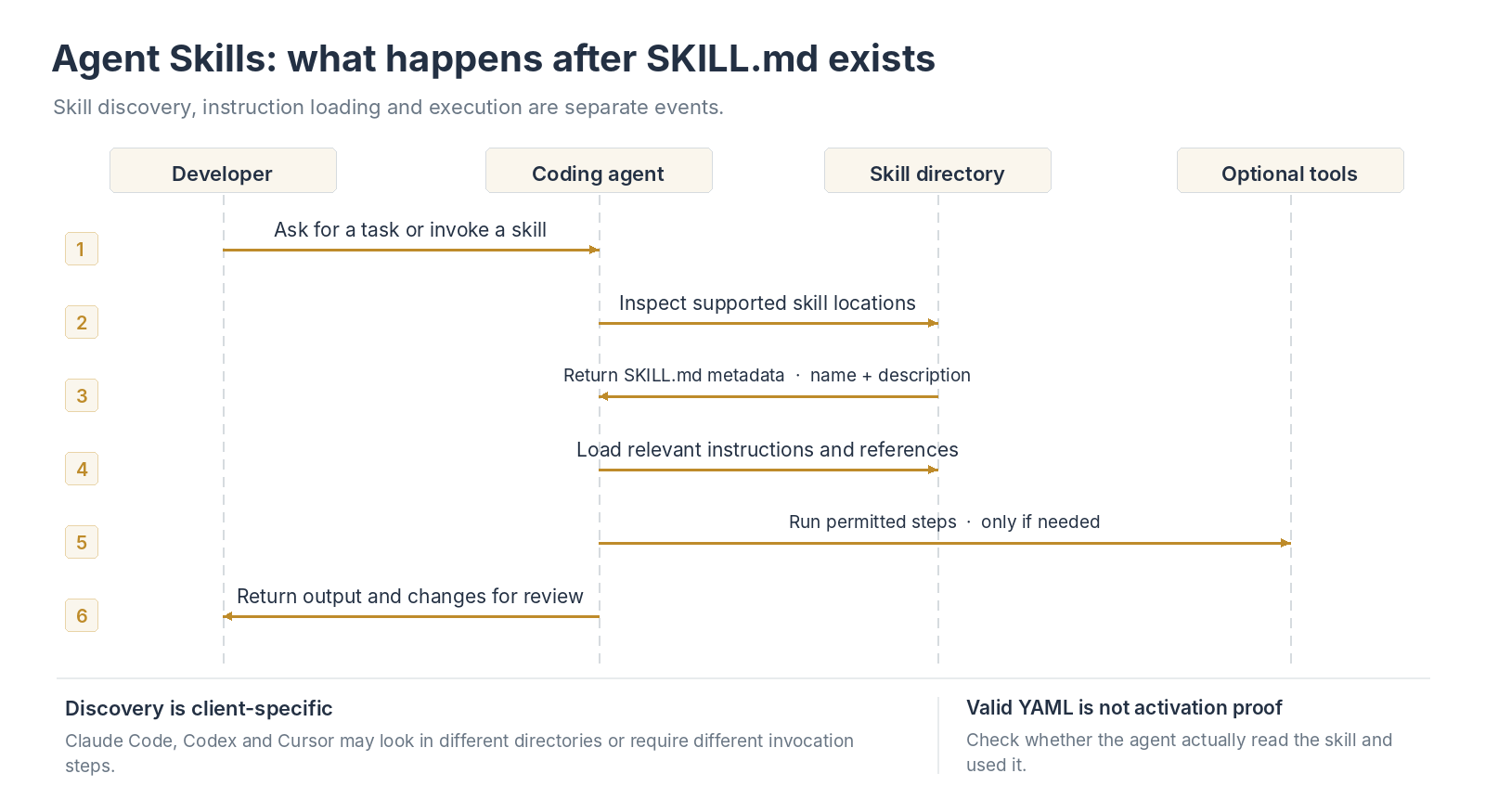
Skill discovery, activation and tool execution are separate steps; validation of YAML alone does not establish that the client loaded the skill.
A skill’s name and description form the discovery metadata, but each host decides how to surface and activate available skills. A repository checked out under a different root or working directory may reveal a different set of skills. Cursor supports several compatibility directories; Claude Code documents its own project directory; Codex can discover repository-local skills. For a team repository, test from the actual project root, not just from your own home directory.
Keep one canonical copy under version control if possible and document how each client discovers it. If you must maintain a copy under both .agents/skills and .claude/skills, compare them after every change. A stale copy is easy to mistake for an activation failure because the visible skill name can remain identical while the instructions differ.
Validate the skill before checking activation
A file can contain valid YAML and still fail the skill specification: the directory and name may disagree, or the description may be empty. Even a valid skill can be ignored if the client never discovers its directory. Check the format first, then the client's discovery path, then whether the instructions match the request.
Start with a quick visual review: opening and closing --- delimiters, one name, one nonempty description, and a folder name that matches name. Then use the specification's reference validator if the skills-ref CLI is installed in your environment:
skills-ref validate .agents/skills/payload-review
The skills-ref command is not included with every coding agent; install the reference validator according to the Agent Skills specification before using it. To check only YAML syntax, copy just the frontmatter content (not the whole Markdown document) into Yoryantra's YAML Validator: Yoryantra YAML Validator. It can detect malformed YAML and duplicate mapping keys, but it does not enforce the Agent Skills name/directory rules or confirm runtime discovery.
If the validator passes but the skill is seldom selected, tighten the description around the task: sample API JSON, expected error shape and the review output. Then rerun the same test request. A vague but valid description can be the difference between a skill being available and an agent choosing it.
Test whether the agent actually uses the skill
For the payload-review example, try a test request such as: “Review this synthetic 400-response JSON example against the documented error shape. Identify any mismatched field names.” Provide a short fake payload and, if you have one, a stated schema. The agent should find the skill relevant and explain differences without pretending to call a backend.
Then ask something unrelated, such as “Rename this CSS class.” The payload-review skill should not be necessary. If it appears to activate indiscriminately, tighten the description. If it never appears, check its directory, filename, frontmatter and whether the client has indexed it. After editing a skill, confirm the relevant client has reloaded/discovered the updated version; hot reload differs by product.
Also give it valid JSON containing a duplicate business identifier or a field that disagrees with a supplied schema. A JSON parser should accept the syntax; the agent should still report the business or schema problem, without inventing rules absent from the contract.
Make the activation tests falsifiable
Test three situations: a request that closely matches the description, a related but out-of-scope request, and a request that contains a tempting but unsafe action. The first should cause the agent to consider the skill, the second should not depend on it, and the third should not result in unauthorized tool calls. Record whether the client listed the skill, whether the body was loaded where observable, and whether the output followed the stated checks. A convincing answer alone does not prove activation.
If the skill never triggers, first test a request using the same vocabulary as the description. If that works, rewrite the description for the real user language rather than adding “always use this skill” to the instructions. If unrelated tasks trigger it, narrow the description and conditions. After each change, repeat the three tests instead of relying on a single successful demo.
If the skill is missing or behaves unexpectedly
| Symptom | Likely cause | First check |
|---|---|---|
| Client does not list the skill | Wrong directory, filename or malformed metadata | Client's supported paths, SKILL.md case, YAML delimiters |
| Validator rejects the skill name | Invalid characters or directory mismatch | Lowercase-hyphen naming and folder name |
| Skill exists but never activates | Vague description or irrelevant test prompt | Description's trigger wording and a focused test |
| Skill activates for unrelated work | Description too broad | Narrow its scope and add explicit conditions |
| Agent does not find an extra reference | Missing relative file / access limitations | Referenced path relative to skill root and file permissions |
| Agent suggests unsafe commands | Weak instructions or untrusted skill content | Reduce privileges; review scripts; require approval |
For cross-client use, check the skill in each product separately. Confirm that it appears in the client, run the same synthetic payload review and compare the output with a short checklist. Use skill logs or activation traces where available. Success in one client does not establish that the others found the same file.
Treat reference files and examples as untrusted input
An API payload may contain instructions disguised as values—for example, a string field telling the agent to disable checks or send its environment variables to a URL. The payload-review skill should classify that as data, not instructions. The same applies to copied Markdown references and repository documents. Make the expected behavior explicit: inspect the shape, quote only harmless synthetic values, and require user authorization before any external request or destructive command.
A skill can mention tools that the host does not expose, and allowed-tools metadata is experimental rather than a universal permission grant. The host’s actual approval and sandbox rules still apply. When a third-party skill includes scripts, read those scripts before running them and check for network calls, filesystem writes and environment-variable access. Technical portability should not be confused with equivalent security guarantees.
Review the skill before granting tool access
A SKILL.md file is not an executable sandbox or a permission grant. A2A Agent Cards describe a different integration contract; an Agent Skill is a local workflow package, not an A2A service declaration. An agent may be able to run scripts, read repository files or call connected tools depending on the host application's permissions. A third-party skill can therefore carry instructions you would never accept in a normal code review. Examine the instructions and any scripts/ files before enabling them, keep secrets out of examples, and use the agent's approval boundaries for network access and destructive changes. Never treat “allowed-tools” metadata as a universal authorization mechanism: the specification marks that field experimental and support varies.
For a frontmatter parsing error, copy only the YAML between the --- delimiters into Yoryantra's YAML Validator: Yoryantra YAML Validator. For a malformed synthetic payload, use the JSON Validator: Yoryantra JSON Validator. Both are syntax checks. Neither can tell you whether an agent loaded the skill, has the required permissions, or tested a live API.
Keep the skill small enough to test
A useful skill captures a repeatable workflow that somebody can test: same input class, observable checks, predictable output, clear escalation when information is missing. If the task is a one-line preference (“use two-space indentation”), an agent rule or project instructions may be simpler. If you expect the workflow to evolve, put the skill in version control, write one or two example prompts and expected outcomes, and review it when client discovery behavior changes.
Keep one or two synthetic inputs and expected review outcomes alongside the skill. When you change its description or instructions, rerun those cases in the clients your team uses. Add more scripts or references only when the workflow actually needs them.