
Your GitHub Actions workflow is green, but the job queue is confusing. A new push cancels a run that was nearly finished. Two deployments start close together and one waits. A test matrix with six combinations runs only two jobs at a time. These symptoms can look related in the Actions UI, but they are controlled by different parts of the workflow.
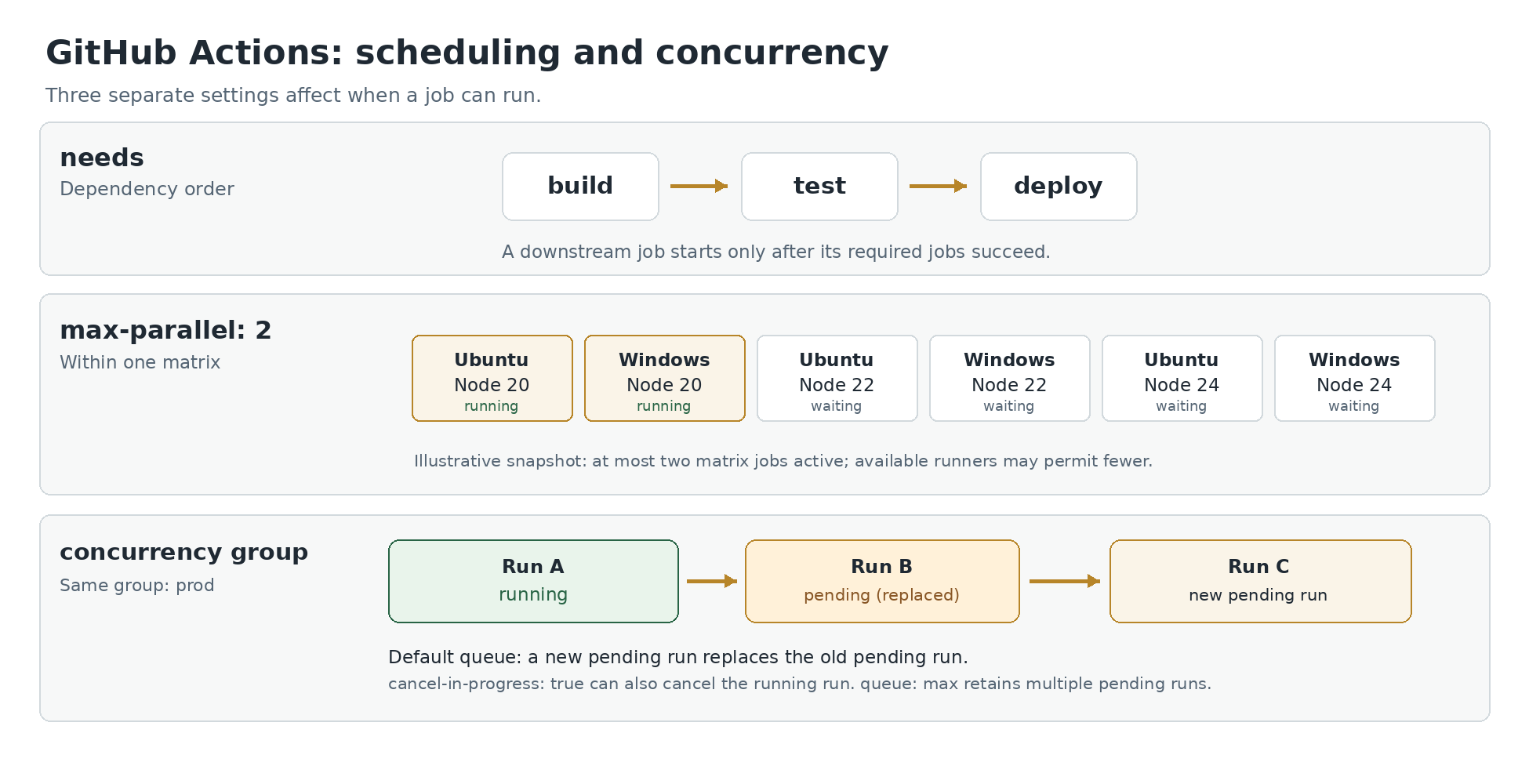
needs decides which job must finish first. max-parallel limits how many versions of a matrix job run at once. A concurrency group decides whether separate jobs or workflow runs may run at the same time. Inside a single job, steps run one after another by default. To run tasks simultaneously, you usually need separate jobs; naming steps differently is not enough. Understanding the scheduling layer makes the YAML much easier to reason about when a build is slow or a deployment has side effects.
GitHub's current documentation includes a queuing option, so “one pending run” should not be treated as an unchangeable platform rule.
A canceled build, a waiting deployment and a slow test matrix may look alike in GitHub Actions, but they have different causes. The examples separate those three situations.
Jobs, steps and dependencies
Suppose a workflow builds a project, then tests it, then deploys it. If those are three steps in one job, the commands normally execute in order on that job's runner. That may be what you want when the next step depends on files produced by the previous one. Splitting them into jobs changes the boundary: each job can run on a different runner, and files do not automatically follow from one job to another.
Separate jobs are eligible to run in parallel unless you declare a dependency such as needs. For example:
name: Build and test
on:
  push:

jobs:
  lint:
    runs-on: ubuntu-latest
    steps:
      - run: echo 'lint goes here'

  unit_tests:
    runs-on: ubuntu-latest
    steps:
      - run: echo 'tests go here'

  package:
    needs: [lint, unit_tests]
    runs-on: ubuntu-latest
    steps:
      - run: echo 'package after checks'
lint and unit_tests may run together if runner capacity is available. package waits for the successful completion of both dependencies under ordinary job-result rules. needs controls the job dependency graph. It does not set a maximum number of other unrelated jobs that GitHub may execute. If one upstream job fails or is skipped, a dependent job can also be skipped unless you deliberately define different conditions.
The echo commands here only illustrate scheduling. A real build would also check out code and install its dependencies. The distinction remains the same: use jobs when work can be isolated, and needs when a later result genuinely depends on earlier work. Do not split commands simply to make the graph look complicated.
A matrix multiplies jobs and max parallel caps that matrix
A matrix is useful when you want the same tests across operating systems or language versions. This example creates six combinations but allows no more than two of its matrix jobs to execute simultaneously:
name: Test combinations
on:
  pull_request:

jobs:
  test:
    runs-on: ${{ matrix.os }}
    strategy:
      fail-fast: false
      max-parallel: 2
      matrix:
        os: [ubuntu-latest, windows-latest]
        node: [20, 22, 24]
    steps:
      - uses: actions/checkout@v7
      - uses: actions/setup-node@v7
        with:
          node-version: ${{ matrix.node }}
      - run: node --version
There are two OS choices and three Node versions, producing six jobs. The cap of two belongs to this matrix. It is not a repository-wide limit and does not force two jobs to run if the account has only one suitable runner available. fail-fast: false tells the matrix strategy not to cancel the remaining variations merely because one non-experimental variation fails; it does not turn failures into successes.
You can use Yoryantra's GitHub Actions Matrix Builder to inspect combinations before copying them into a workflow. It helps with the shape of the matrix, but the actual runtime depends on runner availability, repository settings, permissions, other jobs and any separate concurrency policy you add.
Concurrency groups across jobs and workflow runs
Now suppose you push three commits to the same pull request within a minute. Do you want the runner to finish testing every superseded commit, or should the newest run replace older work? A workflow-level concurrency group can describe that policy:
name: Pull request checks
on:
  pull_request:

concurrency:
  group: checks-${{ github.workflow }}-${{ github.ref }}
  cancel-in-progress: true

jobs:
  check:
    runs-on: ubuntu-latest
    steps:
      - run: echo 'Run the checks for this revision'
The group combines a stable prefix with the workflow name and the triggering ref. Runs with the same group are considered together. With cancel-in-progress: true, a newer run can cancel an already running one in that group. That is useful for cheap, repeatable checks where a newer commit makes an older result obsolete. It can waste work if a check takes a long time, so choose it deliberately.
The group expression matters. If you used only checks for every branch, unrelated pull requests could cancel each other. If you used a value that changes every run, such as a unique run ID, no two runs would share the group and the restriction would accomplish almost nothing. A good group identifies the actual resource or work stream you want to serialize or supersede.
Event contexts can make otherwise reasonable-looking group expressions fragile. github.head_ref is useful for pull requests but is not defined for every push or manual dispatch event. If one workflow supports several event types, select a property available to all of them, such as github.ref when appropriate, or provide an explicit fallback. GitHub's documentation demonstrates a fallback involving a run ID to prevent a missing head ref from creating an invalid expression. But a unique run ID also means those fallback runs will not contend with one another, so it must fit the policy you intended.
Branch naming presents a second design choice. A deployment to a shared staging environment often needs one fixed group for the environment, regardless of which branch triggered it. A CI check usually wants groups separated by pull request or branch. Mixing those intentions under one generic group is why teams see cross-branch cancellations and assume GitHub is behaving randomly. The scheduler is following the group identity you supplied, even when that identity is too broad.
Concurrency group names are repository-scoped and case-insensitive. If a deployment workflow and a test workflow both use the literal group production, they can affect each other even though the workflow files are different. Include the workflow identity when isolation is intended. Deliberately share a group across workflows only when those operations really contend for the same resource.
What happens to a pending run
Without an explicit queue option, a concurrency group permits at most one running and one pending job or workflow run. When another run joins the same group while one is already pending, the earlier pending run is canceled and replaced. Setting cancel-in-progress: true additionally allows a new run to cancel the running one. The effect is easy to miss: “do not cancel an in-progress deployment” and “retain every waiting deployment” are separate choices.
GitHub now documents two queue behaviors:
| Setting | Pending work in one group | Typical reason |
|---|---|---|
| queue: single or omitted | At most one pending run; a newer pending run replaces it | Keep only a recent request while a running job completes |
| queue: max | Up to 100 pending runs; later arrivals are canceled when the queue is full | Keep a bounded sequence of work that should not be silently replaced |
queue: max cannot be combined with cancel-in-progress: true. GitHub says these conflicting controls produce workflow validation failure. The queue is ordered by when jobs begin waiting on the concurrency group, not necessarily the order in which a developer pressed a button or a push event reached the repository. Plan around that distinction when exact ordering matters.
Here is a simplified production serialization policy:
name: Production deployment
on:
  workflow_dispatch:

concurrency:
  group: production-deploy
  queue: max

jobs:
  deploy:
    runs-on: ubuntu-latest
    environment: production
    steps:
      - run: echo 'A reviewed deployment command belongs here'
The example contains no real deployment command and cannot deploy anything. It shows the scheduling and environment placement only. The production environment may require separate reviewers or branch protections depending on repository settings. A queued run is not automatically safe or approved simply because it waits its turn. Ten old deployment requests run sequentially may be worse than one current request reviewed carefully.
Workflow level and job level are not interchangeable
At workflow level, a concurrency policy can cover the entire run. A new pull-request event might cancel a build while its tests are still running. At job level, concurrency can protect only the job that accesses a shared resource, letting independent jobs continue. Choose the narrowest scope that matches the conflict.
For example, your repository could build multiple branches at once but allow only one deployment to staging. Place a concurrency group on the deployment job and use a stable environment-specific name. A separate build job does not need to wait merely because a deployment is busy. Conversely, putting a shared group on every matrix job can accidentally serialize all the matrix variations. That defeats the purpose of max-parallel without producing a clear error message.
If a workflow has both needs and job-level concurrency, the job must first satisfy its dependencies and then be eligible under the concurrency group. If the job is waiting, its UI state may reflect the scheduler or an environment protection rule rather than an application bug. Use the job graph and run details to tell which gate is active.
You can also accidentally create two layers of serialization. A workflow-level group might allow only one entire run for a branch, while a deployment job inside that run waits on a second environment-level group shared with another workflow. That is not necessarily wrong. It can express “one revision of this branch at a time” and “one production change at a time” simultaneously. The cost is that a job can wait longer than the first concurrency block suggests. Document which group protects which resource, and avoid copying the same group into every job without examining the effect.
Choose cancellation differently for tests and deployments
Canceling an obsolete lint job is often harmless. Canceling a migration, an infrastructure apply or a release script halfway through can leave external systems changed. GitHub can stop the job, but it cannot promise to undo side effects already performed by a database, cloud provider or package registry. The next run should discover the real external state and decide whether retrying is safe.
A practical policy might use cancel-in-progress: true for pull-request checks scoped by ref, and queue: max or another controlled serialization mechanism for deployment jobs. That is a starting point, not a universal setting. If the business prefers to discard outdated deployments after new releases arrive, it needs explicit supersession and approval rules instead of blindly running every historical queue entry.
Also consider the lifecycle of secrets and permissions. A concurrency setting controls scheduling; it does not make unsafe events trustworthy, prevent a malicious workflow from reading secrets or ensure a runner has minimal permissions. Treat workflow security, environment approvals and concurrency as different controls.
Why jobs are waiting longer than expected
If a matrix runs two jobs at a time even though you expected six, inspect strategy.max-parallel first. Then check eligible runner capacity and organization limits. Increasing the matrix cap cannot create more available runners. If you are using self-hosted runners, labels and runner availability can narrow the pool more than the YAML suggests.
If a run is unexpectedly canceled, compare its concurrency group with the newer run's group. Remember that group names can collide across workflow files and ignore case. A generic constant such as ci might have been copied into several files. The event log and run list usually reveal the later request that superseded the earlier work.
If a deployment seems stuck, look for a pending run in the same concurrency group, required environment approval, unmet needs dependencies, runner shortages and branch restrictions. Those are independent gates. Changing max-parallel will not solve an unapproved environment job. Changing the concurrency group will not fix a missing runner label.
Be careful when interpreting billing and elapsed time. max-parallel: 2 is a scheduling cap, not a promise that your workflow's elapsed time will be halved, and a concurrency group is not a substitute for capacity planning. Jobs may spend time downloading dependencies, waiting for available runners or executing serialized external tasks such as database migrations. Measure those intervals separately before raising concurrency limits. Running ten identical jobs against an API that permits only two concurrent requests can make the pipeline slower rather than faster.
If you see a validation error after adding queue: max, inspect whether the same concurrency block also sets cancel-in-progress: true. If a workflow parser rejects the YAML before scheduling, the problem may instead be indentation, an unsupported expression context or a malformed mapping. Run the content through Yoryantra's GitHub Actions YAML Validator as a structural review, then confirm behavior with GitHub's current reference. A local validator cannot simulate GitHub's actual scheduler.
Check the scheduling policy with a small experiment
When you are uncertain about cancellation, make a disposable workflow in a test repository with a short sleep and several manual dispatches. Inspect which runs become pending, which are canceled and which complete. Record the group names and compare default queuing with queue: max. For job dependencies, add two independent jobs and one job with needs; for matrix tests, change max-parallel from one to two and observe the graph.
These experiments need no production secrets, and they expose the platform's behavior more clearly than trying a new concurrency setting first on the deployment that changes real infrastructure. Keep the test work isolated. The YAML snippets in this article are illustrative and checked against GitHub's documented syntax, but they were not independently executed on GitHub's hosted runner fleet for this review.
Concurrency is ultimately a statement about which work must wait, which work is obsolete and which side effects cannot overlap. Once those three questions are answered, the configuration is usually short. The harder part is choosing the right group identity and failure policy for the application behind it.
Official references and Yoryantra tools
-
GitHub Control the concurrency of workflows and jobs — https://docs.github.com/en/actions/how-tos/write-workflows/choose-when-workflows-run/control-workflow-concurrency
-
GitHub Running variations of jobs in a workflow — https://docs.github.com/en/actions/how-tos/write-workflows/choose-what-workflows-do/run-job-variations
-
GitHub Workflow syntax — https://docs.github.com/en/actions/reference/workflows-and-actions/workflow-syntax
-
GitHub Security guidance for workflows — https://docs.github.com/en/actions/reference/security/secure-use
-
Yoryantra GitHub Actions YAML Validator — https://yoryantra.com/tools/github-actions-yaml-validator
-
Yoryantra GitHub Actions Matrix Builder — https://yoryantra.com/tools/github-actions-matrix-builder