
Your remote MCP server responds to requests, but the client still cannot call a protected tool. It might show an authorization prompt that never completes, return 401 after login, or accept a token but reject the action with 403. Those symptoms point to different parts of the OAuth flow.
Changing random headers is unlikely to help. The quicker approach is to trace the request from the protected MCP endpoint to its authorization metadata, through the OAuth login flow, and back to the resource server that must validate the resulting token.
The cases below concern remote HTTP-based MCP authorization. A locally launched stdio server uses a different credential boundary and does not automatically perform this OAuth flow. The requests and metadata are intentionally fictional; they are not captures from a production identity provider.
The token issuer and the protected server have different jobs
There are three jobs that are easy to blur together. The MCP client wants to call a tool. The authorization server authenticates the user or client and issues a token. The MCP server protects its tool endpoint as a resource server and decides whether the presented token grants access.
A successful login does not mean the MCP server should trust any token that appears afterward. The resource server still needs to check issuer, intended audience or resource, expiration, signature or other validation mechanism, and the required permissions. The client, meanwhile, must know where the authorization server is and which token it should request.
That explains why “OAuth succeeded” is sometimes followed by a rejected tool call: login and authorization at the resource are separate checks.
A failed request begins with evidence
A typical protected-resource exchange starts when the client makes a request without a usable bearer token. The server should return an HTTP 401 challenge that points the client to Protected Resource Metadata. For example:
HTTP/1.1 401 Unauthorized
WWW-Authenticate: Bearer resource_metadata="https://mcp.example.com/.well-known/oauth-protected-resource/mcp"
The client retrieves that public metadata, which identifies the protected resource and the authorization server or servers that can issue tokens for it. A simplified illustrative response looks like this:
{
  "resource": "https://mcp.example.com/mcp",
  "authorization_servers": ["https://login.example.com"],
  "scopes_supported": ["mcp:read", "mcp:write"]
}
The authorization server publishes its own metadata describing authorization, token, and registration capabilities. Only then does the client have enough information to start the appropriate OAuth flow.
A 401 response that simply says “unauthorized” without usable discovery information may leave an otherwise compliant client unable to determine where to authenticate.
Read the OAuth discovery documents before changing scopes
Protected-resource metadata identifies the MCP resource and the authorization servers it trusts. Authorization-server metadata provides the authorization endpoint, token endpoint, and supported registration methods. Reading only one can make a healthy OAuth deployment look misconfigured.
For an example endpoint at https://mcp.example.com/mcp, the documented resource-metadata path may look like this:
https://mcp.example.com/.well-known/oauth-protected-resource/mcp
Its JSON should describe the public resource identifier that the client is trying to reach, not an internal container hostname. Check the authorization_servers list. Then inspect the selected issuer's published authorization-server metadata. A resource server returning a working JSON document does not prove that the advertised issuer, redirect registration, or token endpoint works.
One common production failure happens when the reverse proxy rewrites https to http while building metadata URLs. A client then sees mixed public and internal origins. Compare the public endpoint, protected-resource metadata, authorization-server issuer, and the value supplied as the OAuth resource parameter. They need to form a coherent chain; they are not all interchangeable URLs.
If metadata is missing, check which component owns the route. A 404 generated by a CDN is not equivalent to one generated by an MCP application. Look for a gateway request ID or response header and follow it into the right logs. That narrows the correction to routing rather than encouraging broad permission changes.
Locate the rejection in the OAuth flow
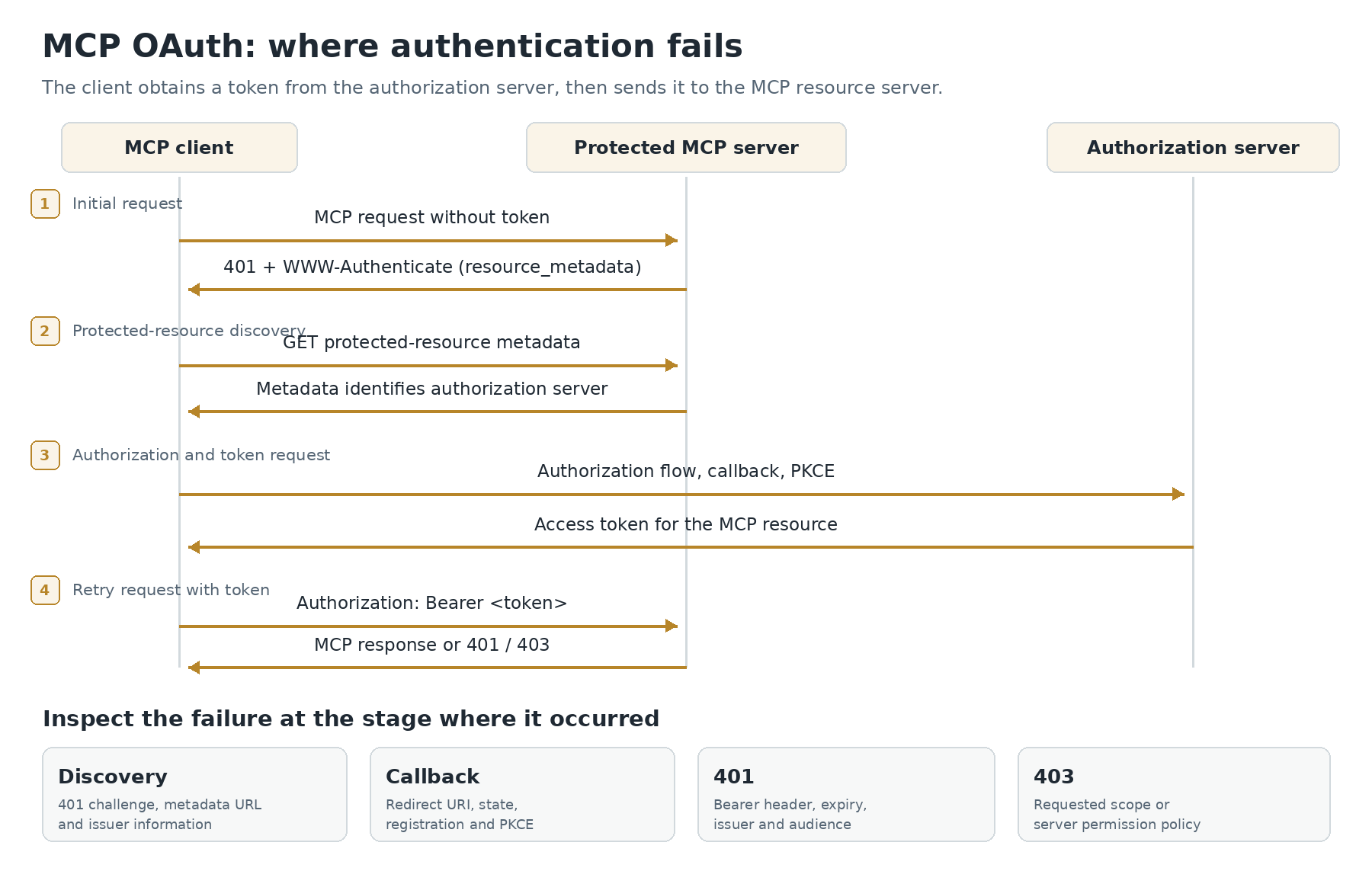
Case 1: The client never finds an authorization server
Check whether the server returned a proper WWW-Authenticate challenge and whether its resource_metadata URL actually responds with valid metadata. Redirect loops, incorrect path-aware well-known routes, stale reverse-proxy configuration, and inaccessible metadata can stop the flow before login begins.
The resource identifier in the metadata should represent the intended MCP resource. If the public endpoint is https://mcp.example.com/mcp but metadata advertises an unrelated internal hostname, a client may request a token for the wrong resource or fail discovery validation.
Do not attempt to repair this problem by pasting a token into a UI. The client needs the correct resource and authorization server relationship.
Case 2: Login starts but the callback fails
A browser error involving redirect_uri usually belongs to client registration or the authorization server's redirect policy. Desktop and CLI clients often use loopback callback addresses, and those can be rejected when the authorization server is configured only for fixed web URLs.
The July 2026 MCP specification tightened authorization behavior, including how clients identify their application type during Dynamic Client Registration. It also moved the standard approach toward Client ID Metadata Documents (CIMD), while keeping DCR for backward compatibility. Older client-registration examples are therefore worth reviewing before copying them into a new deployment.
A redirect mismatch should be diagnosed at the authorization server. Changing the MCP tool's input schema cannot fix an OAuth callback refusal.
Case 3: Login succeeds, but the tool endpoint returns 401
Now inspect the actual request to the MCP endpoint. Is there an Authorization: Bearer header? Has the token expired? Was it minted by the configured issuer? Does it identify this MCP server as the intended resource rather than a different API?
A resource server must not accept a token only because its JWT signature is mathematically valid. A token intended for an email API, for example, does not automatically authorize a ticket-management MCP server, even when both use the same organization login system.
If your implementation validates JWT access tokens, check issuer, audience/resource, expiry, and signing keys using the issuer's current key set. If it uses token introspection, verify the introspection response and resource restrictions instead. The exact mechanism depends on how the authorization server issues access tokens; not every access token is a JWT.
Case 4: The tool endpoint returns 403
A 403 often means the server recognizes the identity but denies the requested action. For example, a token may grant mcp:read while the tool requires mcp:write.
That is a different problem from an invalid token. Check the tool's permission policy, scope hierarchy, user role, and whether the client requested and received the correct scope. Do not grant broad write permissions merely to make a test pass. A least-privilege token that is correctly rejected can be a sign the system is working as intended.
HTTP status interpretation depends on the complete response. A gateway may produce its own 401 or 403 before MCP application code runs, so correlate the response with reverse-proxy and identity-provider logs.
Match the symptom to the component that rejected it
| Symptom | First evidence to inspect | Common fix direction |
|---|---|---|
| Login prompt never appears | 401 challenge and resource metadata URL | Repair protected-resource discovery |
| Metadata fetch fails | HTTP status, well-known path, redirects | Correct routing and published public URL |
| OAuth callback rejected | redirect_uri, client registration, application type | Align authorization server registration |
| Login completes, then 401 | Bearer header, issuer, audience, expiry | Request and validate the correct resource token |
| Tool works read-only, fails to write | Scopes and per-tool policy | Grant only the required permission |
| Works locally, fails behind CDN | Forwarded headers, public scheme, well-known routes | Correct reverse-proxy handling |
Use the table to choose the next inspection point, not to substitute for logs. Two systems can return the same HTTP code for different reasons.
Why the token's audience matters
Consider a client that obtains an access token intended for https://orders.example.com/api and sends it to https://mcp.example.com/mcp. Both services may trust the same corporate identity provider. That does not make the token interchangeable.
A correctly configured MCP resource server checks whether the token was issued for the particular protected resource. Otherwise, a token obtained for a less-sensitive service could be reused against a more powerful one. This is a form of token confusion; the safe design binds authorization to the intended audience or resource.
When debugging, log stable request IDs, issuer identifiers, the expected resource and the outcome of each validation step. Do not record raw bearer tokens or full private claims in ordinary application logs.
What changed in MCP's July 2026 specification
Authorization hardening is not just a cosmetic protocol revision. The July 28 specification expects clients to validate the authorization-server issuer identifier returned in the authorization response, helping prevent mix-up between multiple login providers. It also binds client credentials to the issuer that created them and advances Client ID Metadata Documents as the preferred registration approach.
These points are especially relevant when an application supports several enterprise identity providers or moves from a development login service to production. A client may appear to work with one authorization server and fail with another because the servers have different registration policies or issuer metadata.
Avoid publishing a blanket instruction to disable issuer checking or audience verification. Those checks are security boundaries, not troubleshooting obstacles.
A 401 after login: three different causes
Suppose the browser completes authorization and the MCP client immediately receives another 401. It is tempting to repeat login, but the second attempt often reproduces the same defect. Separate the evidence into three parts.
The token never reached the endpoint. The client may not attach its bearer header after a redirect, or a proxy may remove the header before passing the request upstream. Confirm the header's presence at the appropriate trusted server boundary without printing its value in a log. If the header is absent, debugging JWT signing keys won't help.
The token reached the endpoint but is invalid for this resource. Check the issuer, expiration, resource/audience and the method the resource server uses to validate the token. A valid token for another API is still the wrong credential. If the issuer exposes opaque access tokens, treating the token as a JWT and trying to decode its claims is an incorrect debugging assumption.
The token is acceptable but its scopes are insufficient. A resource may challenge with a required scope, and an MCP client may need a step-up authorization flow. The remedy is not to ask every user for every possible scope. Request the permission required for the requested operation, confirm consent or policy where applicable, and re-test the operation. The July 2026 authorization specification explicitly describes scope challenges and step-up behavior.
This distinction also explains why the HTTP status alone is not a complete diagnosis. A gateway may reject a request before MCP code sees it. A resource server may use 401 to challenge for a missing or inadequate bearer token, while another component may return 403 for an established policy denial. Inspect the WWW-Authenticate header, response origin, and server logs together.
Issuer mix-up is a security failure, not a login inconvenience
Consider an application configured for both a corporate identity provider and a development identity provider. A callback arrives after authorization, but the client does not check that the response came from the issuer it expected for that request. An attacker-controlled or misconfigured authorization server could confuse the client about which issuer supplied the code.
The July 2026 MCP authorization requirements address that risk through issuer identification in the authorization response. Clients must validate the returned issuer before redeeming a code. Client credentials are also tied to the issuer that issued them, rather than reused across providers. If a migration breaks issuer checks, fix the issuer configuration and client registration; disabling the check merely hides the mismatch.
The change toward Client ID Metadata Documents has a different purpose: it helps clients identify themselves without depending entirely on dynamic registration at each authorization server. Older Dynamic Client Registration can remain supported for compatibility. The presence of older clients is a migration-planning problem, not justification for removing current security checks from the server.
Verify the authorization boundary with a controlled test
Use test credentials and a non-production MCP server where possible. Confirm the public MCP endpoint and metadata URLs. Send one unauthenticated request and inspect the challenge. Then complete authorization using the supported client flow and try one read-only tool that needs a known permission.
If that passes, try a second operation that requires a different scope. This helps verify that authorization is not simply turned off for all tools. The expected outcome is not “everything works.” It is that permitted calls succeed and disallowed calls are rejected predictably.
Where a server supports separate public and protected tools, test both. Public discovery should not accidentally expose private operations; protected tools should remain protected even if a model or client asks for them in a different way.
When recording the diagnosis, note which component rejected the request: edge gateway, MCP resource server, authorization server, or downstream API. That tells the next engineer where to apply a fix.
Shortcuts that create new authentication problems
Don't reuse an API key as if it were an OAuth access token. Authentication schemes carry different meanings and validation expectations. If the provider explicitly supports a key-based mode, document it as a separate integration path.
Don't place bearer tokens in article examples. Use obviously fictional domains and redacted headers. Even temporary test tokens should not be copied into screenshots, source control, analytics or issue trackers.
Don't confuse CORS with OAuth. Browser cross-origin restrictions may block a client request before the expected authorization flow, but adding permissive CORS headers doesn't make a wrong token valid.
Don't mistake 403 for a reason to expand permissions. Confirm that the requested tool call is legitimate and that the user should have access before updating scopes.
Don't assume a local stdio MCP process needs remote HTTP OAuth. The host application's permission model and local process privileges need their own review.
Keep connection and authorization failures separate
If Inspector cannot launch the server or discover its tools, fix connection and protocol mechanics first. If the remote endpoint is reachable but access is refused, use the authorization chain described here. The two investigations can be adjacent without becoming duplicate articles.
For developers integrating OAuth into an agent, a successful token exchange is only the middle of the story. Reliable integration also requires clear scope policy, correct audience binding, and a resource server that rejects unsuitable tokens every time.
References
- MCP 2026-07-28 specification announcement: https://blog.modelcontextprotocol.io/posts/2026-07-28/
- MCP TypeScript SDK protected-resource authorization guidance: https://ts.sdk.modelcontextprotocol.io/v2/serving/authorization
- MCP Apps authorization architecture: https://apps.extensions.modelcontextprotocol.io/api/documents/authorization.html
- OAuth client resource binding guidance: https://ts.sdk.modelcontextprotocol.io/v2/clients/oauth