
An assistant receives a support request, sends it to a specialist, and produces a reasonable answer. The response looks correct, but the logs do not show which agent handled the request, why the handoff happened, or whether a policy check ran before a tool call. That becomes a serious problem when the specialist can change records rather than simply describe them.
The OpenAI Agents SDK gives Python applications a runtime for agents, tools, handoffs, guardrails, and tracing. A handoff changes which agent owns the conversation. A guardrail checks a specific boundary. A trace records what happened during the run. None of them automatically replaces authentication or authorization in your application.
We'll use a fictional customer-support workflow: a triage agent handles general questions and may transfer a delivery-status question to a specialist. The example intentionally avoids refund or payment tools. The SDK examples follow the current Python documentation available in October 2026. Actual model runs need an API key and may incur usage costs; the examples below were reviewed against published APIs but were not run against a live model.
A handoff changes ownership of the answer
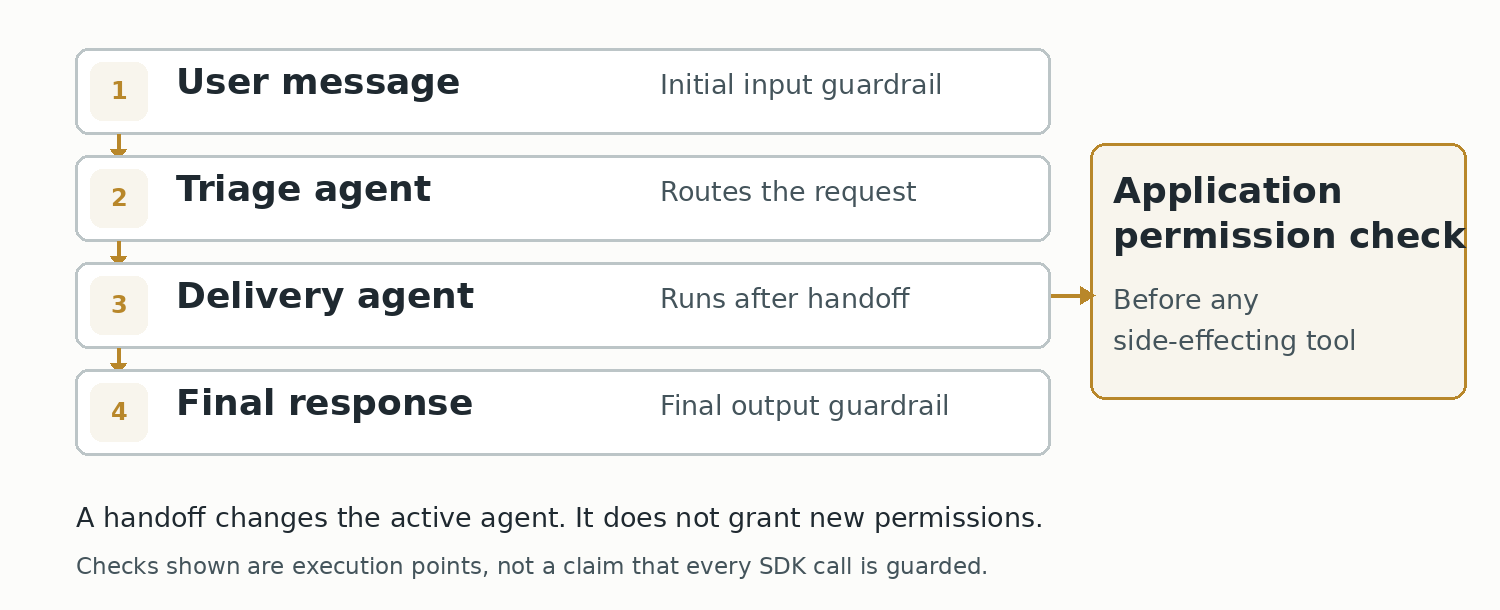
Suppose a customer asks, “Where is parcel P-104?” Your application has a general support agent and a delivery specialist. One design is to let the triage agent answer everything. Another is to give the triage agent a handoff to the specialist and let the specialist finish the user-facing response.
The SDK's handoffs field supports this transfer. The handoff is exposed to the model as a tool-like choice, commonly named along the lines of transfer_to_delivery_agent. When the runtime performs the transfer, the receiving agent takes over the conversation. That is different from calling a specialist as a normal tool and returning its output to the original agent.
The following two-agent example uses a handoff:
import asyncio
from agents import Agent, Runner


delivery = Agent(
    name="Delivery agent",
    handoff_description="Handles parcel-status questions.",
    instructions=(
        "Explain shipment status using only details in the conversation. "
        "If a live lookup is needed, say that no tracking service is connected."
    ),
)

triage = Agent(
    name="Support triage",
    instructions=(
        "Answer general support questions. Transfer parcel-status "
        "questions to the delivery agent. Do not invent live tracking data."
    ),
    handoffs=[delivery],
)


async def main():
    result = await Runner.run(triage, "Where is parcel P-104?")
    print(result.final_output)
    print("Final agent:", result.last_agent.name)


if __name__ == "__main__":
    asyncio.run(main())
Install the Python package using pip install openai-agents and configure the API credentials through your normal secret-management process. The example includes no actual shipment database. A real answer about P-104 would require a trusted, authorized lookup tool. Without one, the specialist should acknowledge that it cannot retrieve live status.
The last_agent field identifies the agent that produced the final result. Inspect the run trace to see the selected handoff, intermediate calls, and guardrail execution.
Handoffs versus a specialist called as a tool
The choice affects who responds to the user and which credentials are available during execution. With a handoff, the specialist becomes the active agent. With Agent.as_tool(), a manager agent can ask a specialist for a bounded result and then decide how to continue. Both can be valid, but neither is a reason to give every agent the same broad credentials.
A refund-support application is an easy example. A classification specialist might inspect a complaint and return a category. If the main agent must always speak to the customer and approve the final answer, using the specialist as a tool can be a better fit. If the customer should converse directly with a specialist for several turns, a handoff may be appropriate.
Avoid building five agents where one or two suffice. More handoffs can mean more context passing, model turns, and debugging work. Assign specialists based on clear responsibilities, not because “multi-agent” sounds more advanced than a well-designed single-agent flow.
Define final-response ownership and permissions for side effects in application policy. The model's routing choice should not be allowed to grant a specialist greater access than the authenticated user actually has.
Customize the transfer without trusting model-supplied fields
The SDK's handoff() helper can attach an on_handoff callback, custom tool description, and an optional structured input_type. For example, an escalation agent may need a reason recorded for audit purposes. The model can propose a reason, but the application should not treat that reason as a verified permission or priority.
from pydantic import BaseModel
from agents import Agent, RunContextWrapper, handoff


class EscalationNote(BaseModel):
    reason: str


async def record_handoff(
    context: RunContextWrapper[None], note: EscalationNote
):
    print("Handoff reason (model supplied):", note.reason)


escalation = Agent(
    name="Escalation agent",
    instructions="Handle cases requiring a human support review.",
)

escalation_handoff = handoff(
    agent=escalation,
    on_handoff=record_handoff,
    input_type=EscalationNote,
)
This is a fragment to add to an agent's handoffs list, not a complete application. The input schema validates the shape of the callback data; it cannot prove the truth of a model-generated reason. When a handoff may initiate a sensitive workflow, check the current user's permission before writing anything to your actual ticket system.
According to the SDK documentation, handoffs use their own execution path. Function-tool guardrails do not automatically run on the handoff operation. If the policy depends on parsed handoff arguments, enforce it in on_handoff before side effects, or prevent the handoff from being enabled for a caller who should not reach the destination.
The receiving agent may see more history than expected
A common surprise is that a specialist receives the earlier conversation context as part of the handoff. That can be useful for continuity, but it may include irrelevant or sensitive data from another part of the workflow.
The SDK provides an input_filter mechanism and handoff-history controls. Use them when a specialist needs only a selected part of the discussion. For example, a shipping specialist may need the parcel reference and the user's shipping question, not previous financial-account discussion. A filter is a data-minimization tool; it is not a substitute for tenant-level access checks.
Inspect the actual handoff history in a controlled test. Ask whether the specialist received exactly the data required for its task, and verify that redaction happens before a model or external service sees the material. Do not assume a carefully worded specialist instruction removes confidential details from the context that was already supplied.
Guardrails run at specific boundaries, not everywhere
The SDK exposes agent-level input and output guardrails. Their placement is easy to misunderstand in multi-agent applications:
| Check | When it runs | What it does not guarantee |
|---|---|---|
| Input guardrail | Initial input of the first agent | Not automatically repeated after every handoff |
| Output guardrail | Final output of the agent producing the answer | Cannot undo a tool's earlier side effect |
| Function-tool guardrail | Before or after a guarded function-tool call | Not automatically applied to hosted tools or handoff calls |
A guardrail that rejects a harmful final answer may protect the displayed response while still being too late to stop a tool that already executed. Likewise, a guardrail on the first user's message is not guaranteed to inspect each piece of later retrieved content. Decide what must be prevented before execution rather than relying on a final-output check to detect damage after it happens.
The current SDK documentation also distinguishes parallel and blocking input checks. Parallel checks improve latency, but the agent may consume tokens or execute tools before the guardrail result arrives. For workflows where a rejected request must not cause any tool execution, a blocking input guardrail is more appropriate.
A small deterministic input guardrail
A deterministic rule can be useful for a narrow demonstration. This guardrail rejects a request when it contains a fictional internal test marker. It is not a real prompt-injection detector, and it does not validate a user's identity.
from agents import (
    Agent, GuardrailFunctionOutput,
    RunContextWrapper, input_guardrail,
)


@input_guardrail(run_in_parallel=False)
async def block_demo_marker(
    ctx: RunContextWrapper[None],
    agent: Agent,
    user_input: str | list,
) -> GuardrailFunctionOutput:
    text = user_input if isinstance(user_input, str) else str(user_input)
    blocked = "DEMO_BLOCK" in text
    return GuardrailFunctionOutput(
        output_info={"blocked": blocked},
        tripwire_triggered=blocked,
    )


safe_triage = Agent(
    name="Guarded support triage",
    instructions="Answer simple support questions.",
    input_guardrails=[block_demo_marker],
)
The guardrail receives initial input and returns a GuardrailFunctionOutput with a tripwire flag. When it triggers, the runner raises an input-guardrail tripwire exception rather than returning a normal agent answer. A production application should catch that exception and return a suitable user-facing result.
The example converts list-shaped input to text only for demonstration; real applications should inspect typed input items deliberately, without dumping attachments or private payloads to logs. A string-marker rule is useful as a test fixture because the expected decision is clear, but it is not capable of identifying the wide range of malicious or simply unsafe requests found in production.
For applications with database-write tools, place decisive authorization in the server that performs the write. A model-facing guardrail can improve routing and feedback, but the executor must still check the user, tenant, target resource, permitted action, and confirmation state before changing data.
Check tool arguments before execution
Suppose a triage agent correctly passes its initial input check. The model then requests a function tool to update a shipping address. The tool call may carry an address or customer identifier that wasn't present in the initial user message. A per-tool input guardrail can inspect those proposed arguments immediately before execution.
The SDK's tool-guardrail support covers guarded function tools and certain local MCP integrations. Its documentation lists exceptions: hosted tools and built-in execution tools do not follow the same function-tool guardrail pipeline, and a handoff is not a normal function-tool invocation. Don't apply one global label—“all tools guarded”—unless you've verified the execution path for every tool type you use.
Even with a tool guardrail, enforce authorization again in the downstream API. An AI framework might be upgraded, reconfigured, or bypassed by another integration. The resource-owning service remains responsible for its own permissions. The same backend authorization rules should apply whether the request comes from a web frontend or an agent.
For high-impact actions, a human approval stage can be appropriate. Approval is meaningful only if it identifies what will happen: the resource, action, intended target, and relevant data. A generic “allow agent?” button gives the reviewer too little information to make a real decision.
Tracing helps explain where control went
Tracing is enabled by default in the normal server-side Agents SDK path. An end-to-end trace can show model generations, agent turns, tool calls, handoffs, and guardrail checks. Traces contain spans corresponding to the operations that occurred. A specialist taking control should appear as a handoff and a subsequent agent operation, not merely as a differently worded answer.
Use a named trace when investigating a specific workflow. The SDK's trace context manager and per-run configuration allow you to organize records, and the Traces dashboard can help you inspect the sequence. For example, a support workflow may show triage making a decision, handing off to the delivery specialist, and the specialist generating a final reply.
Tracing doesn't prove the answer was correct. A trace can show that a tool returned “delivered,” but it doesn't tell you whether the tool looked up the right customer's parcel unless you captured and validated the right identifiers. Observability is evidence about execution; correctness requires test assertions and trustworthy data sources.
Treat trace payloads as potentially sensitive. Prompts, retrieved text, and tool inputs may contain customer information or credentials. Review the SDK's tracing configuration, data-retention policies, and your organization's privacy requirements. The SDK documentation notes that tracing is unavailable for organizations using OpenAI APIs under Zero Data Retention policies. It also documents controls for disabling tracing when required.
Inspect a failed run in the trace
When a multi-agent request fails, inspect the recorded sequence: initial agent, available handoffs, selected destination, forwarded context, guardrail results, tool calls, and final response. Compare that sequence with the intended routing and permission policy.
If result.last_agent names the triage agent after a parcel-status question, the model may not have selected the handoff. Check the specialist's handoff description and the original agent instructions. Do not immediately grant the triage agent direct access to parcel data merely to make the answer look better.
If a tripwire triggers on an ordinary message, inspect the rule's actual input and expected boundary. A strict keyword rule will produce false positives. Change the guardrail only after you've confirmed what it was supposed to prevent and whether the mistake is in the rule, input normalization, or application context.
If the final response is acceptable but a tool executed unexpectedly, investigate that tool path first. A friendly user-facing answer does not cancel a side effect that already happened. Check tool authorization logs and whether the model was allowed to call the tool at all.
Four regression cases for the support example
A minimal test set should cover routing, denial, context and side effects:
- Ordinary general question: triage answers without unnecessary handoff. Record the final agent and trace sequence.
- Parcel-status question: the delivery specialist takes over, but does not invent an unconnected tracking result.
- Blocked demo marker: the blocking input guardrail rejects before the model or tools are executed.
- Unauthorized address change: even if the model proposes the write, the downstream application rejects it when the user lacks permission.
The fourth case requires an actual authorized resource API and audit logs to verify; it cannot be established from the toy two-agent example alone. When these cases are automated, keep test customer data fictional and make assertions about executed side effects, not just text in the final answer.
Pin the SDK version in deployments where behavior must be reproducible, and rerun these cases after upgrades. Guardrail and tracing features evolve; copying code from an older article without checking the installed version can produce misleading results. The present examples were checked against official documentation, but they remain illustrative until run with a configured SDK and live credentials in your environment.
Keep authorization and auditing in application code
Use handoffs when another specialist should own the conversation. Use agent-as-tool when a manager needs a bounded specialist result without surrendering control. Put guardrails at the input, output, and tool boundaries they actually cover. Keep authorization, tenant isolation, approval of side effects, and auditing in application infrastructure you control.
Use traces to inspect agent selection, executed tools, and the timing of guardrail checks. Retain enough evidence to reproduce unexpected routing or execution, without retaining sensitive payloads unnecessarily. Keep the number of agents proportional to the work. Every additional handoff needs its own routing tests, context checks, and authorization boundary.
References
- OpenAI Agents SDK Python documentation: https://openai.github.io/openai-agents-python/
- Handoffs, callbacks, structured handoff input and filters: https://openai.github.io/openai-agents-python/handoffs/
- Agent-level and tool-level guardrails and execution modes: https://openai.github.io/openai-agents-python/guardrails/
- Built-in tracing and tracing controls: https://openai.github.io/openai-agents-python/tracing/
- OpenAI official SDK quickstart: https://developers.openai.com/api/docs/guides/agents/quickstart?lang=python